Features How It Works Platform Download App FAQ Login Register Company
B2B Employee Call Monitoring SaaS

Track Every Call.
Manage Every
Employee.

CallWorks gives business owners real-time visibility into every call, attendance, meetings & EoD reports. Manage your telecallers, sales agents and field teams smarter — from anywhere.

100%
Call Coverage
Real-time
Sync & Reports
Dual SIM
Auto Track
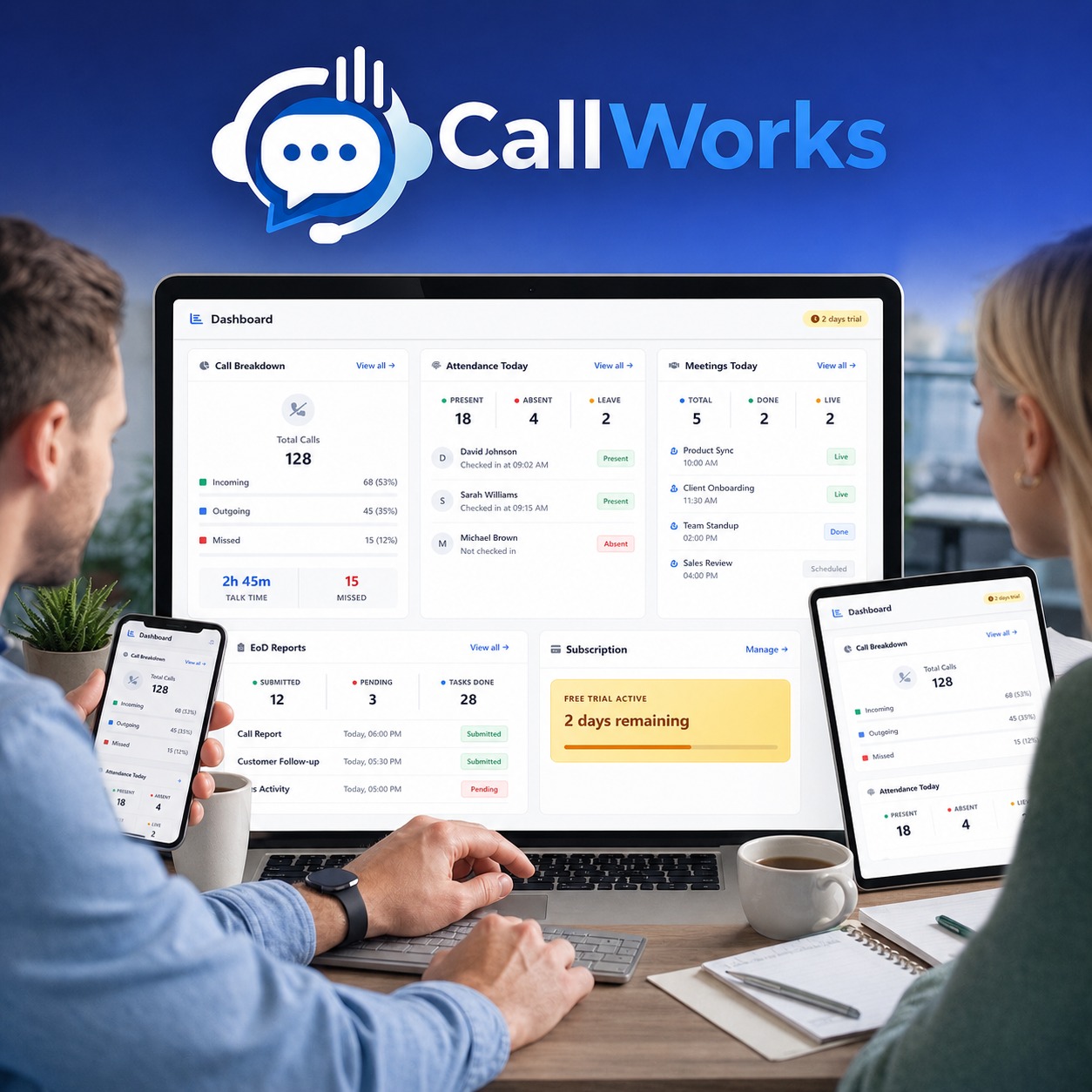
CallWorks Dashboard Preview
Today's Calls
128 +24%
Live Tracking
18 Employees Active
Bank-grade Security
Real-time Sync
IST Timezone
24/7 Support
Made in India

Everything You Need to Track & Manage

Built for businesses that rely on telecallers, sales agents, and field teams. Know what's happening — always.

Real-Time Call Tracking

Every call automatically tracked — incoming, outgoing, missed, rejected. No manual entry. Auto-sync to dashboard in real time.

Call Breakdown Analytics

Visual dashboards with daily, weekly & monthly call breakdowns. Talk time, call counts, performance — all at a glance.

Attendance Management

Mark check-in/check-out from mobile. Geo-location tagged. Daily, weekly, monthly attendance calendar with leave management.

EoD Reports

Employees submit end-of-day work logs from the app. Track tasks completed, pending items & daily activity in one tap.

Meeting Tracking

Schedule, log and track client meetings. Add notes, photos & follow-up reminders. Never miss an opportunity.

Employee Management

Add unlimited employees, assign roles, manage credentials — all from web panel. View KPIs and individual performance.

Dual SIM Support

Works with both SIM 1 and SIM 2 on Android. Employees pick their work SIM — only that SIM is monitored. Privacy first.

Auto Sync to Dashboard

Call logs auto-sync from Android phone to web dashboard in real time. IST timezone — accurate timestamps always.

7-Day Activity View

See your team's 7-day call activity trend in one screen. Spot top performers and who needs follow-up coaching.

Secure & Private

Data encrypted with HTTPS. Stored on Indian servers. Only your company admin can access — no third-party access ever.

Smart Notifications

Get instant alerts for missed targets, late check-ins, pending EoD reports. Stay informed — no manual chasing.

Up & Running in 4 Simple Steps

No technical expertise needed. Get your team monitored in minutes — not days.

1

Register Your Company

Create your company account on CallWorks web panel in under 2 minutes. Just company name, email, and password — no credit card.

2

Add Your Employees

Add telecallers, sales agents, or field staff from the Employees section. Each gets their own login credentials automatically.

3

Install App on Employee's Phone

Download CallWorks Android app on employee's phone. They log in with credentials and select work SIM. Done!

4

Monitor from Anywhere

Open your dashboard anytime — laptop, mobile, or tablet. See calls, attendance, meetings & reports in real time.

CallWorks Mobile App Showcase

One Platform, Complete Visibility

From call tracking to attendance, EoD to meetings — every feature crafted for Indian business teams.

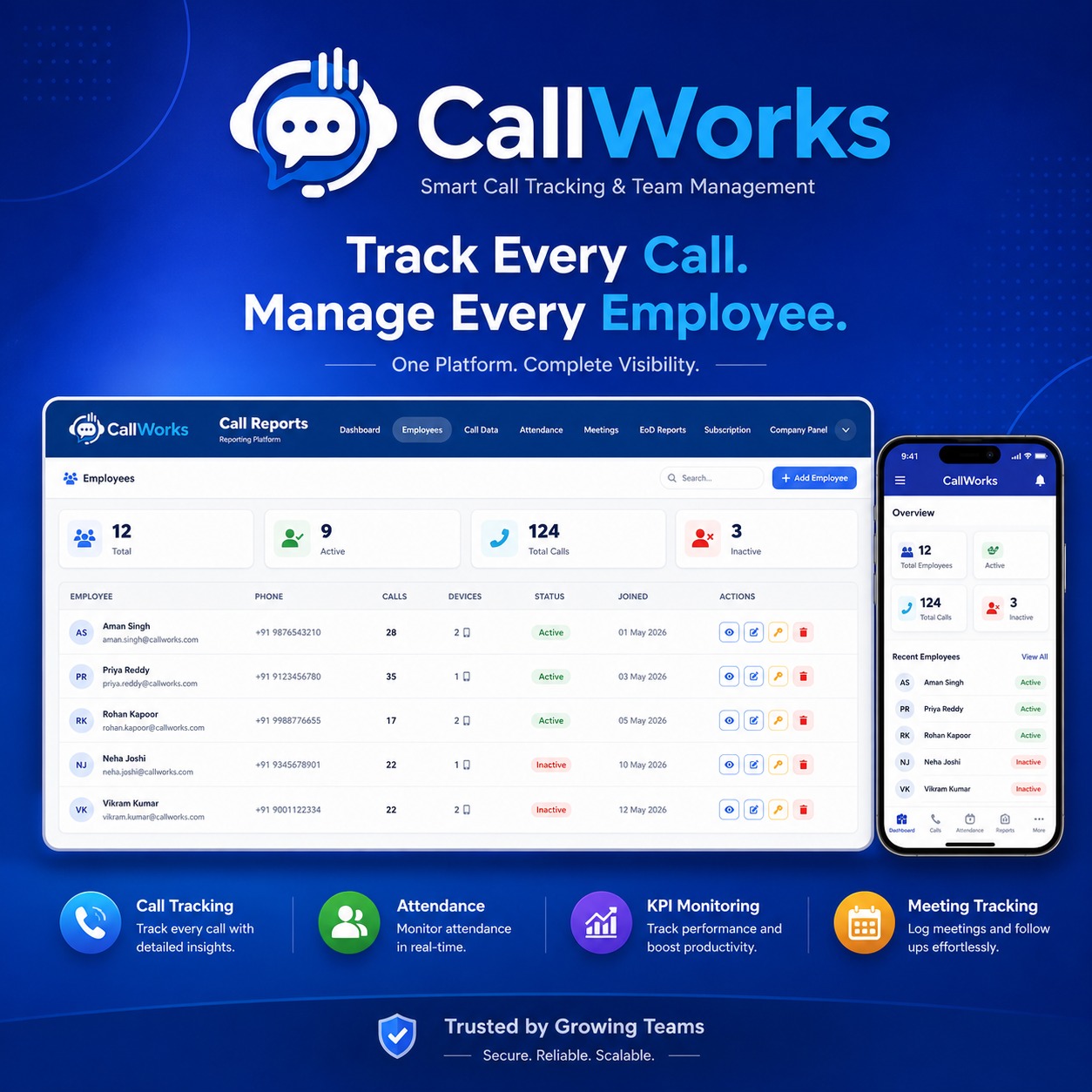
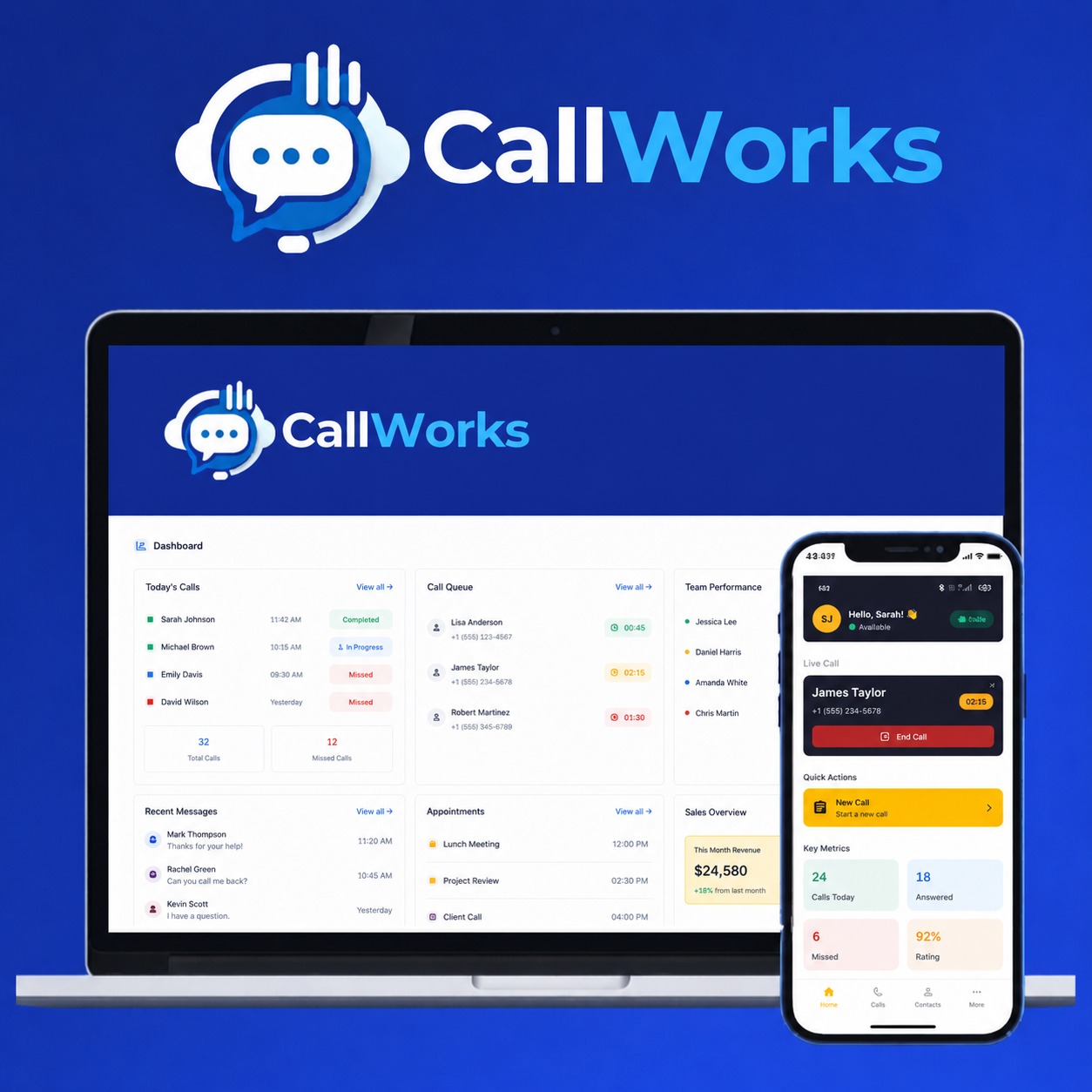
CallWorks Smart Dashboard

Smart Dashboard for Owners & Admins

Get a bird's-eye view of your entire team. Track calls, employees, devices, status, and join dates — all in one beautiful, intuitive panel.

Total Employee OverviewActive vs inactive employees with phone numbers and devices.
Aggregated Call StatsTotal calls across all employees with daily breakdown.
Quick Employee ActionsEdit, deactivate or change credentials with one click.
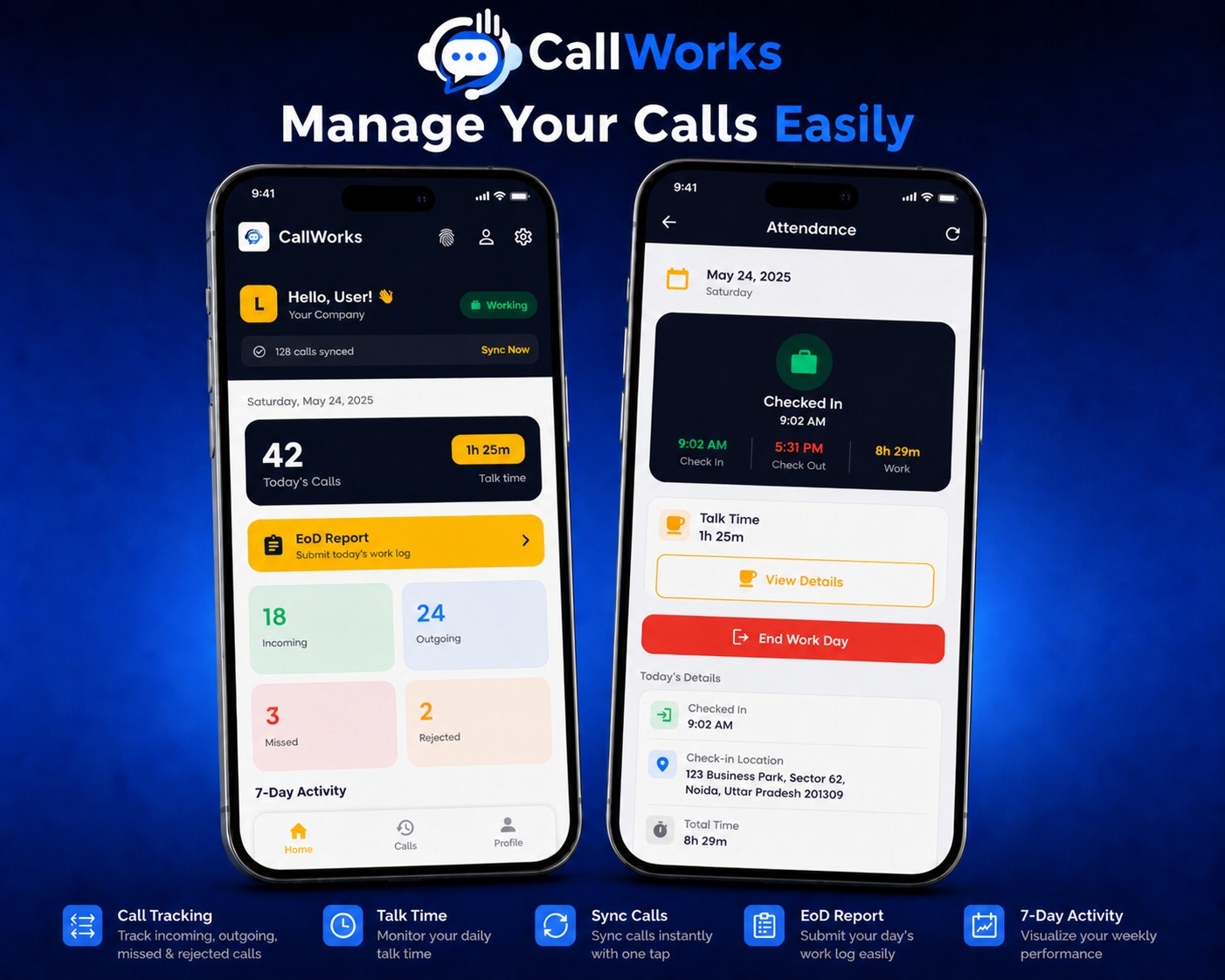
Mobile App Dashboard

Mobile App with EoD Reports & Attendance

Employees mark attendance, submit EoD reports, sync calls and view their daily activity — all from a clean, fast Android app.

One-Tap AttendanceCheck-in & check-out with location tagging in seconds.
EoD Reports Made EasySubmit today's work log in 30 seconds. Owner sees it instantly.
Manual Sync OptionSync today, last 7 days, or last 30 days on demand.
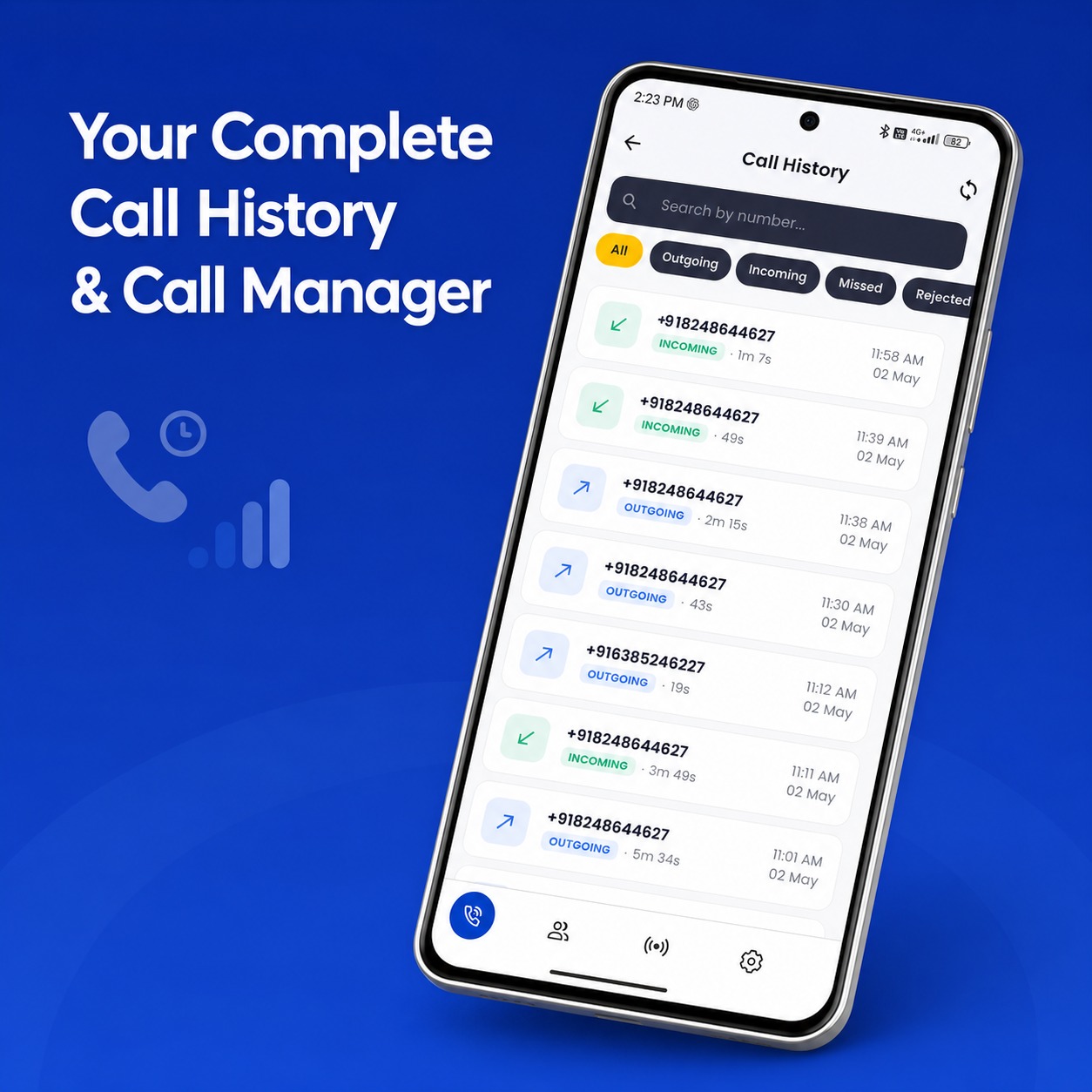
Call History

Complete Call History & Search

Searchable call history with filters for incoming, outgoing, missed and rejected calls. Find any call in seconds.

Search by NumberQuickly find calls to or from any phone number.
Type FiltersFilter by incoming, outgoing, missed or rejected — instantly.
Duration & TimestampEvery call shows duration and exact IST timestamp.
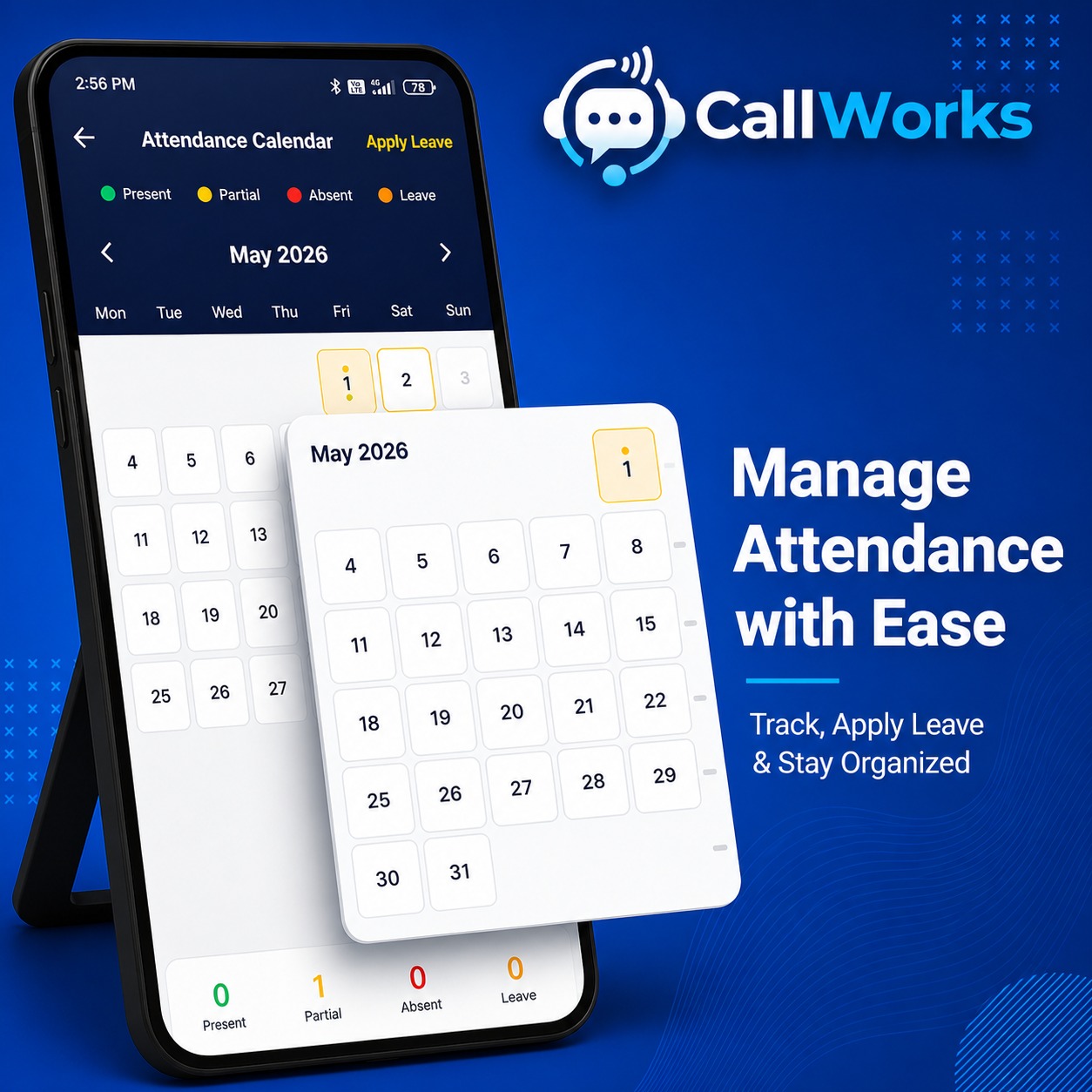
Attendance Calendar

Attendance Calendar with Leave Management

Visual monthly calendar showing present, absent, partial and leave days. Apply for leave directly from the app.

Visual Monthly ViewColor-coded calendar — green present, red absent, yellow partial.
Apply Leave OnlineSubmit leave applications. Owner approves with one tap.
Monthly SummarySee total present, partial, absent and leave days at a glance.
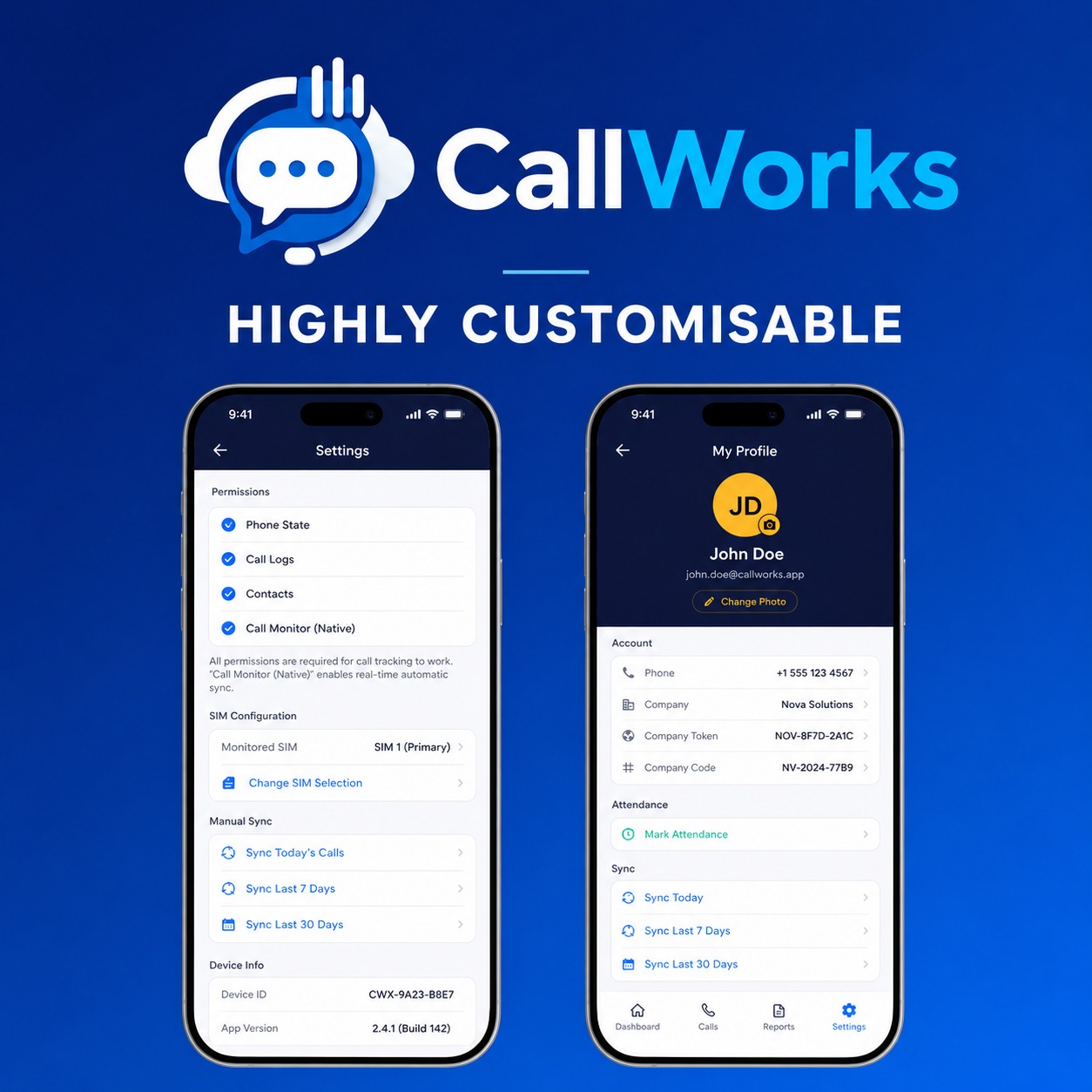
Profile and Settings

Highly Customisable Settings

Configure SIM monitoring, sync intervals, permissions and personal profile. Each employee has full control over their app.

SIM ConfigurationChoose primary SIM. Native call monitor for accurate sync.
Permission ControlPhone state, call logs, contacts — all toggleable.
Profile Photo UploadPersonalize with your photo. View company token & code.
CallWorks Mobile App

Install the Employee App Now

The CallWorks Android app runs silently in the background, automatically tracking calls, attendance, and EoD reports — zero manual work for your employees.

Works on all Android phones (Android 8+)
Lightweight — minimal battery & data usage
Runs silently in background — no interruption
Dual SIM support built-in
Auto syncs calls + attendance + EoD to web
IST timezone — accurate timestamps always
Direct APK download. Enable "Install from unknown sources" before installing. Safe & verified.

See CallWorks In Action

Powerful dashboard on web. Simple app on mobile. Everything connected, in real time.

Track Every Call
Track Every Call
Manage every employee from one platform
Manage Your Calls
Manage Calls Easily
Mobile dashboard with attendance details
Smart Call Tracking
Smart Team Management
Web panel with employee KPIs and stats
Call History
Complete Call History
Searchable logs with filters and timestamps
Attendance Calendar
Attendance Calendar
Manage attendance and leave applications
Profile and Settings
Customisable Profile
SIM config, permissions and sync controls
Mobile App Showcase
Mobile App Showcase
Calls, attendance, EoD — all in one place
Track Every Call
Track Every Call
Manage every employee from one platform
Manage Your Calls
Manage Calls Easily
Mobile dashboard with attendance details
Smart Call Tracking
Smart Team Management
Web panel with employee KPIs and stats
Call History
Complete Call History
Searchable logs with filters and timestamps
Attendance Calendar
Attendance Calendar
Manage attendance and leave applications
Profile and Settings
Customisable Profile
SIM config, permissions and sync controls
Mobile App Showcase
Mobile App Showcase
Calls, attendance, EoD — all in one place

Frequently Asked Questions

Everything you need to know about CallWorks. Can't find what you're looking for? Chat with us on WhatsApp.

Will CallWorks track personal calls of my employees?
No. Employees select which SIM to monitor (their work SIM). Only that SIM's calls are tracked. Personal SIM calls are completely ignored — privacy is fully respected.
How quickly do calls sync to the dashboard?
Calls sync in real-time as soon as the call ends. The mobile app uploads call data instantly when internet is available. If offline, calls sync automatically once connection is back.
Does the app work on iPhone?
Currently, CallWorks employee app is Android-only (Android 8+). iOS doesn't allow call log access for security reasons. The web admin panel works on all devices including iPhone, iPad, laptops.
Is there a setup fee or hidden charges?
No setup fee. No hidden charges. Start with a 3-day free trial — no credit card required. Upgrade only when you're satisfied. For pricing details, contact us on WhatsApp.
Is my data secure? Where is it stored?
All data is encrypted with HTTPS and stored on secure servers in India. Only your company admin can access your team's data. We never share, sell, or analyze your data for any purpose.
Can I cancel my subscription anytime?
Yes, absolutely. Cancel anytime with no penalty. You'll have access until the end of your billing cycle. Your data stays available for 30 days after cancellation in case you change your mind.
Do you provide training and support?
Yes! We provide free onboarding video, written guides, and WhatsApp support. Enterprise plans get dedicated account managers and priority response. Just message us — we're always here.
Can I track multiple companies from one account?
Yes, with the Enterprise plan. Our owner panel lets you manage multiple companies, branches, or franchises from a single login — perfect for agencies, multi-location businesses, and group companies.

Ready to Take Control of Your Team's Performance?

Register your company on CallWorks today. Free trial — no credit card required. See the difference in 24 hours.

3-Day Free Trial
No Credit Card
Setup in Minutes
Cancel Anytime
Chat with us on WhatsApp